
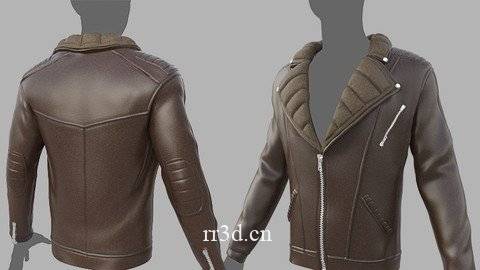
学习在 Marvelous Designer 中为角色创建服装布夹克和在 Zbrush 中创建造型的基础知识
最后更新 7/2019
MP4 | 视频:h264, 1280×720 | 音频:AAC,44.1 KHz
语言:英语 | 大小:6.20 GB | 时长:7h 51m
你会学到什么
为角色创建更可信的布料
了解 Marvelous Designer 的 UI 和导航
在 Zbrush 中雕刻服装细节
创建干净且可操作的图案
高效创建和管理接缝
要求
Marvelous Designer 和 Keyshot 不需要任何知识。这是为绝对的 Marvelous Designer 初学者准备的。但是Zbrush和Photoshop需要基础知识
描述
讲师 InfoManuel Rondon 目前是一名自由 3D 艺术家和大学讲师。他喜欢这两种工作,因为它们让他可以从事他热爱的工作,同时仍然拥有一些创作自由。他对刚起步并希望进入该行业的学生的建议是知识渊博并对 3D 艺术的不同领域持开放态度,因为这可以为您提供更多工作机会。随着您获得更多经验,您可以专注于角色、纹理或动画,但在开始时,最好尽可能多地戴帽子。课程信息 在本课程中,您将学习使用 Marvelous Designer 时的正确工作流程。我们将从 Marvelous Designer 的介绍开始,然后我们将继续制作冬季皮夹克。在这之后,我们将把它带到 Zbrush 中进行一些更改,稍后我们将在 Keyshot 中渲染它。最后,我们将从 Keyshot 中获取所有渲染并在 Photoshop 中进行合成。Mavelous Designer 使服装创作比大多数解决方案更容易,这就是为什么它被许多专业工作室广泛用于为角色创作服装的原因。
概述
第 1 节:简介
第一讲 简介
Lecture 2 Marvelous Designer 简介 Part I
第三讲 Marvelous Designer 简介 Part II
第 2 部分:在 Marvelous Designer 中制作夹克
第 4 讲 设置参考
第5讲制作夹克主体
第 6 讲 缝制袖子
第 7 讲创建另一个袖子
第 8 讲 创建衣领
第 9 讲添加最终细节
第 10 讲 导出到 ZBrush
第 3 节:在 Zbrush 中添加细节
Lecture 11 在 Zbrush Part I 中添加细节
Lecture 12 在Zbrush中创建一个Stitch Brush
Lecture 13 在 Zbrush Part II 中添加细节
Lecture 14 在 Zbrush Part III 中添加细节
Lecture 15 在 Zbrush Part IV 中添加细节
Lecture 16 在 Zbrush Part V 中添加细节
第17讲在Zbrush中添加细节第六部分
Lecture 18 在 Zbrush Part VII 中添加细节
第19讲创建另一种类型的针刷
第 20 讲 固定夹克的内部
第21课精炼夹克上一部分
第22讲 精制夹克第二部分
第 23 课最终要求和导出
第 4 节:在 Keyshot 中渲染和在 Photoshop 中合成
第 24 讲 Keyshot Part I 中的渲染
第25讲 Keyshot Part II中的渲染
第26课 Photoshop中的合成
第 5 部分:奖金
第27讲 将自定义模型导入Marvelous Designer
任何想要更有效地创造逼真的服装的人,任何想要在创造布料方面做得更好的人都是成为角色艺术家的重要组成部分
Learn the Basics of Creating Garment Cloth Jacket for Character in Marvelous Designer and Sculpt in Zbrush
Last updated 7/2019
MP4 | Video: h264, 1280×720 | Audio: AAC, 44.1 KHz
Language: English | Size: 6.20 GB | Duration: 7h 51m
What you’ll learn
Create more believable cloth for characters
Understand Marvelous Designer’s UI and Navigation
Sculpt garment details in Zbrush
Create clean and workable patterns
Create and manage seams efficiently
Requirements
No knowledge required for Marvelous Designer & Keyshot. This is for absolute Marvelous Designer beginners. But basic knowledge is required for Zbrush & Photoshop
Description
Instructor InfoManuel Rondon is currently working as a freelance 3D artist and college instructor. He loves both jobs because they allow him to work on what he is passionate about while still having some creative freedom. His advice for students who are just starting out and want to make it in the industry is to be knowledgeable and be open to different areas of 3D art as this can give you more opportunities for jobs. As you gain more experience, you can then specialize in characters, textures, or animations but in the beginning, it’s best to wear as many hats as possible. Course Info In this course, you will learn the proper workflow when using Marvelous Designer. We will start with an introduction to Marvelous Designer, then we will move on to create a winter leather jacket. After this, we will take it into Zbrush to make some changes and we’ll render it later on in Keyshot. Finally we will take all the renders from Keyshot and do a composition inside Photoshop. Mavelous Designer makes garment creation much easier than most solutions that is why it is widely used in many professional studios to create clothing for characters.
Overview
Section 1: Introduction
Lecture 1 Introduction
Lecture 2 Introduction to Marvelous Designer Part I
Lecture 3 Introduction to Marvelous Designer Part II
Section 2: Building the Jacket in Marvelous Designer
Lecture 4 Setting Up the References
Lecture 5 Making the Main Body of the Jacket
Lecture 6 Sewing the Sleeves
Lecture 7 Creating the Other Sleeve
Lecture 8 Creating the Collar
Lecture 9 Adding the Final Details
Lecture 10 Exporting to ZBrush
Section 3: Adding Details in Zbrush
Lecture 11 Adding Details in Zbrush Part I
Lecture 12 Creating a Stitch Brush in Zbrush
Lecture 13 Adding Details in Zbrush Part II
Lecture 14 Adding Details in Zbrush Part III
Lecture 15 Adding Details in Zbrush Part IV
Lecture 16 Adding Details in Zbrush Part V
Lecture 17 Adding Details in Zbrush Part VI
Lecture 18 Adding Details in Zbrush Part VII
Lecture 19 Creating Another Type of Stitch Brush
Lecture 20 Fixing the Interior of the Jacket
Lecture 21 Refining the Jacket Part I
Lecture 22 Refining the Jacket Part II
Lecture 23 Final Requirements and Exporting
Section 4: Rendering in Keyshot and Compositing in Photoshop
Lecture 24 Rendering in Keyshot Part I
Lecture 25 Rendering in Keyshot Part II
Lecture 26 Compositing in Photoshop
Section 5: BONUS
Lecture 27 Importing a Custom Model to Marvelous Designer
Anyone who wants to create realistic garment more efficiently,Anyone who wants to get better at character creation as creating cloth is a huge part of being a character artist
原创文章,作者:steven,如若转载,请注明出处:https://rr3d.cn/35404.html
