
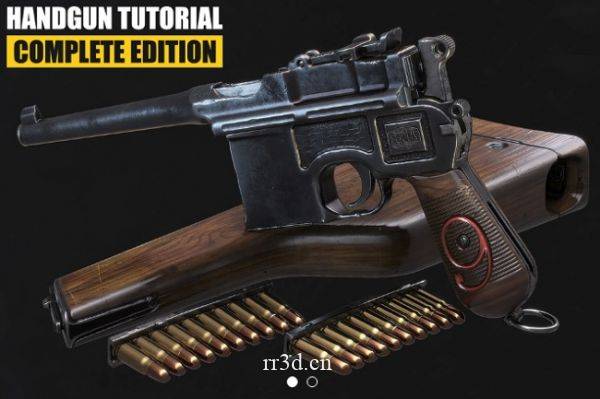
您是否正在考虑在视频游戏行业担任 3D 艺术家的职业?您想成为更快、更高效的建模师并学习 3D 建模、纹理和游戏艺术方面的最新技术吗?本教程将帮助您了解和应用创建高质量 PBR 游戏资产的各个方面!
在我们按照当前的视频游戏标准对手枪进行建模、拆包、烘焙、纹理和渲染时,请按照本课程进行。每一步都记录在案,无需快速转发。
3D Studio Max 和 Zbrush 简介:
您将在超过 5 个半小时的完整评论视频中详细了解我的工作流程以及对 3D Studio Max 和 Zbrush 的介绍。我将为您提供我每天使用的所有脚本、热键和插件。本章将教您学习本教程所需的所有技能。
Max 和 Zbrush – 建模:
建模部分涵盖了枪模型的整个建模过程,包括blockout、highpoly和lowpoly。您将使用布尔运算等高级建模技术立即创建复杂的形状,而无需设置耗时的支持循环。您将学习如何使用 Zbrush 快速创建高多边形模型以及为枪添加伤害传递,使其在所有其他武器模型中脱颖而出。在建模过程之后,我们将直接为资产创建 UV 坐标,并关注优化 UV 布局的重要性,以获得尽可能高的纹素密度。
Substance Painter – 纹理:
建模后,我们将在 Substance Painter 中烘焙我们的资产。您将学习如何创建完美的烘焙、修复烘焙错误以及如何创建最终资产所需的所有贴图。之后,您将学习如何为手枪制作超逼真的纹理。我将在超过 5 个半小时的完整评论视频中教给您有关纹理创建的所有知识。
您将学习如何从头开始创建枪所需的每种材料,并使用程序纹理、蒙版和生成器来增加磨损,从而产生逼真的纹理。
Marmoset Toolbag – 渲染:
在本章中,您将学习如何在 Marmoset Toolbag 中为手枪创建逼真的渲染。我会教你如何点亮你的资产并设置你的相机和环境来为枪创建逼真的照明。我将教你如何使用狨猴相机的后期处理效果以及 Adobe Photoshop 中的最终调整来创建组合就绪的图像。
我需要什么才能遵循本教程?
建议使用我在整个教程中使用的相同软件来完成课程。
3D Studio Max 2019(或之前版本)
Substance Painter 2018(或之前版本)
Pixologic Zbrush 2019(或之前版本)
Marmoset Toolbag
Adobe Photoshop
Duration 19h Project Files Included MP4
Gumroad – Handgun Tutorial – Complete Edition
Info:
Are you thinking about a career as a 3D artist in the video game industry? Do you want to become a faster and more efficient modeler and learn the latest techniques in 3d modeling, texturing and game art? This tutorial will help you understand and apply all aspects of creating high-quality PBR game assets!
Follow this course as we model, unwrap, bake, texture and render a handgun to current generation video game standards. Every step is documented without fast forwarding.
Intro to 3D Studio Max and Zbrush:
You will get a detailed overview of my workflow and an introduction to 3D Studio Max and Zbrush in over 5 and a half hours of fully commented video. I will be providing you with all the scripts, hotkeys, and plugins that I use on a daily basis. This chapter will teach you all the skills that you need to follow the tutorial.
Max and Zbrush – Modeling:
The modeling part covers the entire modeling process of the gun model, including blockout, highpoly and lowpoly. You will use advanced modeling techniques like boolean operations to create complex shapes in no time, without having to set up time-consuming support loops. You will learn how to use Zbrush to quickly create a high-poly model as well as add a damage pass to the gun, making it stand out from all the other weapon models out there. After the modeling process, we will jump straight into creating UV coordinates for the asset and focus on the importance of an optimized UV-Layout to get the highest texel density possible.
Substance Painter – Texturing:
After modeling, we will bake our asset in Substance Painter. You will learn how to create perfect bakes, fix baking errors and how to create all the maps needed for the final asset. Right after, you will learn how to make an ultra-realistic texture for the handgun. I`ll teach you everything you need to know about texture creation in over 5 and a half hours of fully commented video.
You will learn how to create every material needed for the gun from scratch and use procedural textures, masks, and generators to add wear and tear resulting in a photorealistic texture.
Marmoset Toolbag – Rendering:
In this chapter, you will learn how to create realistic renderings for the handgun in Marmoset Toolbag. I`ll teach you how to light your asset and set up your camera and environment to create realistic lighting for the gun. I will teach you how to create portfolio ready images using post-processing effects through the marmoset cameras as well as final adjustments in Adobe Photoshop.
What do I need to follow this tutorial?
It is recommended to follow the course with the same software I use throughout the tutorial.
3D Studio Max 2019 (or previous version)
Substance Painter 2018 (or previous versions)
Pixologic Zbrush 2019 (or previous versions)
Marmoset Toolbag
Adobe Photoshop
原创文章,作者:steven,如若转载,请注明出处:https://rr3d.cn/28129.html
