
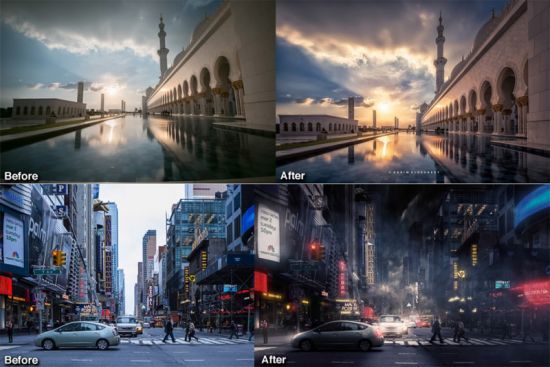
亮度蒙版可让您在 Photoshop 中创建华丽而逼真的编辑。Lumenzia 允许您快速轻松地使用它们。其先进的 JavaScript 引擎会在后台为您处理所有亮度遮罩的复杂性,因此您只需考虑制作精美的图像。
工作原理:
预览以轻松选择正确的预设或自定义蒙版。
将预览应用为选区或蒙版。
按位置/颜色进行细化,清理粗糙的边缘,并无损地在蒙版上绘画以获得完美的效果。
主要优点:
• 在视觉上选择和屏蔽任何东西!使用 Lumenzia,您可以在应用蒙版之前获得全屏预览。交互式单击图像以选择(或取消选择)您希望的色调/颜色。添加和减去通道无需猜测。使用简单的选择将蒙版隔离到图像的特定部分。并且您可以组合组蒙版以轻松查看整体蒙版效果。创建或自定义正确的蒙版从未如此快速和轻松。并且蒙版以 16 位甚至 32 位深度创建,允许在极端蒙版中平滑过渡。
• 点击挑选!您不必知道要使用哪个遮罩,只需使用内置的区域和范围工具即可自动创建正确的遮罩。
• 不碍事。Lumenzia 提供了一个紧凑的面板,只有您需要的按钮,并且完全不需要通道托盘。这留下了空间,即使在笔记本电脑屏幕上,也可以轻松查看大而美的图像。Lumenzia 中的每个操作只创建一个历史步骤,因此您可以使用 <ctrl>-Z 撤消任何操作。因为 Lumenzia 是用 JavaScript 编写的,所以它足够聪明,可以为您处理错误和其他棘手的情况。
• 简化曝光混合。自动堆叠、对齐和排序曝光从亮到暗以进行混合。
• 较小的文件。Lumenzia 不使用频道,因此您的文件很小。此外,它还提供 BlendIf 和矢量蒙版以避免图层蒙版膨胀,以及“组合”工具来减少组蒙版的影响。在创建通道掩码时,Nikon D800 的典型 TIF 文件从 200MB 增长到 1.4GB,但在 Lumenzia 中将保持相同的 200MB 大小。而且 Lumenzia 可以结合组掩码来显着减少文件大小,通常可以将文件大小减少 20-50%!
• 轻松制作美丽的小插曲。只需在目标区域周围绘制一个选区,即可在图像中创建任意大小、锐度或位置的晕影。小插图可以很容易地修改、倒置(使中心变亮)或与亮度蒙版结合使用(以避免使阴影太暗)。
• 有关更多信息,请参阅 Lumenzia 常见问题解答和完整的功能列表。
Lumenzia 功能:
• 简化的工作流程和完全自定义的蒙版
• 滑块可轻松自定义完美的亮度蒙版
• BlendIf 和矢量蒙版(以节省大量文件空间并避免更新蒙版的需要)
• 能够像图层一样查看和编辑亮度选择遮罩
• 添加、减去或交叉任何遮罩或选区以进行高级控制
• 颜色遮罩(按颜色和/或亮度选择,视觉上)
• 局部对比度增强(轻松自动地显示更多细节)
• 实时遮罩(参见混合结果)立即尝试不同的蒙版)
• 区域蒙版以进行精确细化
• 区域和范围选择器(通过单击图像直观地选择正确的蒙版)
• 区域贴图以可视化区域 0-10 中的图像或显示高光/阴影溢出
• “较亮/较暗”遮罩(选择相对于周围像素的像素)
• 边缘和表面遮罩用于去除光晕并避免锐化噪声。
• 将蒙版细化到图像中的特定位置或颜色
• 组合蒙版(合并组蒙版以节省空间并准确查看蒙版内容)
• 高级减淡和燃烧:修改减淡颜色/亮度、视觉编辑
• 支持路径,以方便使用建筑中具有硬边缘的亮度蒙版
• 分屏可同时查看蒙版和图像
• “预混合”可自动堆叠、对齐和排序曝光以进行混合
• 32 位蒙版和自动灰度优化以获得终极质量
• 保存大于 4GB 的文件,可在 Lightroom 中查看
• 自定义小插图
• 非破坏性海绵工具(高级饱和度绘画)
• 饱和度蒙版(特定颜色的振动控制)
• 应用或通过单击替换现有图层上的蒙版
• 亮度和灰尘可视化工具,可轻松查找和修复缺陷
• 人像(表面模糊)和风景(高通)的高级锐化方法
• 可记录的动作,包括明暗蒙版/选择你自己的行为。
• 培训和支持视频,以及全面的书面手册
• 有关上述功能的更多详细信息,请参阅演示和完整的功能列表
Lumenzia 在我的 Dodging & Burning 和 Exposure Blending Master 课程中得到了广泛的介绍。
系统要求:Lumenzia 兼容 Windows 和 OSX 上的 Photoshop CS6 – CC 2019+(推荐 CC 2019 或更高版本)。这包括对 Apple Silicon 的支持。
(包括 Rosetta 下的 Big Sur 和 M1 / Apple Silicon)。
macOS 安装到 /Library/Applications Support/Adobe/CEP/extensions。
版本 10 需要 Photoshop 23,但 v9 插件适用于所有版本,直到 CS 6
File size: 18.4 MB Language: Multilingual
Luminosity masks allow you to create gorgeous and realistic edits in Photoshop. Lumenzia allows you to use use them quickly and easily. Its advanced JavaScript engine handles all the luminosity masking complexity for you in the background, so all you need to think about is making beautiful images.
How it works:
Preview to easily choose the right preset or custom mask.
Apply the preview as a selection or mask.
Refine by location/color, clean up rough edges, and paint on the mask non-destructively for perfect results.
Key benefits:
• Select and mask anything, visually! With Lumenzia, you get a full screen preview of the mask before you apply it. Interactively click on the image to select (or deselect) the tones/colors to the degree you wish. No guesswork with adding and subtracting channels. Isolate the mask to to specific parts of the image with a simple selection. And you can combine group masks to easily see the overall mask impact. It’s never been faster and easier to create or customize the right mask. And the masks are created in 16 and even 32-bit depth, allowing for smooth transitions in extreme masks.
• Click to pick! You don’t have to know which mask to use, just use the built-in zone and range tools to create the right mask automatically.
• It’s stays out of the way. Lumenzia offers a compact panel with only the buttons you need, and completely eliminates the need for the channels pallet. This leaves room to easily see your images big and beautiful, even on a laptop screen. Every action in Lumenzia creates just a single history step, so you can undo anything with <ctrl>-Z. And because Lumenzia is programmed in JavaScript, it’s smart enough to take care of errors and other tricky situations for you.
• Simplify exposure blending. Automatically stack, align, and sort your exposures light to dark for blending.
• Smaller files. Lumenzia doesn’t use channels, so your files stay small. Additionally, it offers BlendIf and vector masks to avoid layer mask bloat, as well as a “Combine” tool to reduce the impact of group masks. A typical TIF file from a Nikon D800 grows from 200MB to 1.4GB when creating channel masks, but would remain the same 200MB size in Lumenzia. And Lumenzia can combine group masks to significantly cut down on file size, often reducing file size by 20-50%!
• Beautiful vignettes with ease. Just draw a selection around the target area to create a vignette of any size, sharp, or position in the image. The vignette can be easily modified, inverted (to lighten the center) or combined with luminosity masks (to avoid darkening shadows too much).
• For more information, please see the Lumenzia FAQ and full list of features.
Lumenzia features:
• Streamlined workflow and completely custom masks
• Sliders to easily customize the perfect luminosity mask
• BlendIf and Vector masks (to save significant file space and avoid the need to update masks)
• Ability to see and edit luminosity selections just like a layer mask
• Add, subtract, or intersect any mask or selection for advanced control
• Color masks (select by color and/or luminosity, visually)
• Local Contrast Enhancement (easily and automatically bring out more detail)
• Live masks (see the blended result immediately and try different masks)
• Zone masks for precise refinement
• Zone and Range pickers (select the right mask visually by clicking on the image)
• Zone maps to visualize the image in zones 0-10 or show blown highlights/shadows
• “Lighter/Darker” masks (select pixels relative to surrounding pixels)
• Edge and Surface masks for halo removal and avoiding sharpening noise.
• Refine masks to specific locations or colors in the image
• Combine masks (merge group masks to save space and see exactly what is masked)
• Advanced dodging and burning: revise dodge color/brightness, visual editing
• Support for paths, to facilitate use of luminosity masks with hard edges in architecture
• Split-screen to see the mask and image simultaneously
• “PreBlend” to automatically stack, align, and sort exposures for blending
• 32-bit masks and automatic grayspace optimization for the ultimate quality
• Save files >4GB which can be viewed in Lightroom
• Custom vignettes
• Non-destructive sponge tool (advanced saturation painting)
• Saturation masks (color-specific vibrance control)
• Apply or replace masks on existing layers with a single click
• Luminosity and dust visualization tools to easily find and fix defects
• Advanced sharpening methods for portraits (surface blur) and landscape (high pass)
• Recordable actions to include light and dark masks/selections in your own actions.
• Training and support videos, as well as a comprehensive written manual
• See demos and the full list of features for more details on the above features
Lumenzia is featured extensively in my Dodging & Burning and Exposure Blending Master Courses.
System requirements: Lumenzia is compatible with Photoshop CS6 – CC 2019+ on both Windows and OSX (CC 2019 or later recommended). This includes support for Apple Silicon.
(including Big Sur and M1 / Apple Silicon under Rosetta).
macOS Install into /Library/Applications Support/Adobe/CEP/extensions.
Version 10 requires Photoshop 23, but the v9 plugin will work on all versions down to CS 6
Download rapidgator
https://rg.to/file/6808fe29c0bf6b8844013da134beba98/Lumenzia_9.2.3_PS_Plugin_%5Bduplicate%5D.zip.html
Download nitroflare
https://nitro.download/view/0C990C55D195FE6/Lumenzia_9.2.3_PS_Plugin__duplicate_.zip
Download 百度网盘
原创文章,作者:steven,如若转载,请注明出处:https://rr3d.cn/22025.html
