
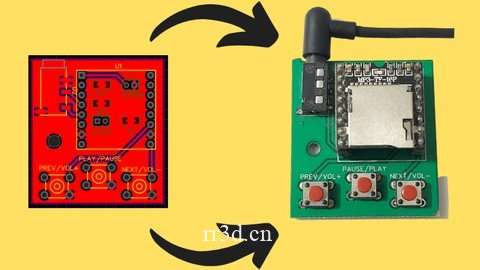
PCB 设计世界的初学者指南
已发布 11/2022
MP4 | 视频:h264、1280×720 | 音频:AAC,44.1 KHz
语言:英语 | 大小:3.43 GB | 时长:4 小时 11 米
你会学到什么
PCB 设计工作流程
EasyEDA 软件的各种功能
构建一个很酷的 MP3 播放器
原理图和布局设计规则
Gerber 文件生成用于制造
足迹验证走线
宽度计算
PCB 的不同层(丝印、阻焊、粘贴掩模)
要求
带互联网连接的笔记本电脑/电脑
描述
通过从头开始构建 MP3 播放器来学习 PCB 设计。从制作参考电路、测试它们、设计原理图和布局到最终享受成品!通过本综合课程熟练设计 PCB 了解 EasyEDA 软件为 MP3 播放器设计 2 层 PCB!掌握 EasyEDA 提供的各种功能EasyEDA掌握与 PCB 相关的概念(过孔、覆铜、走线宽度、层等)生成 Gerber 制造文件并知道它包含什么内容了解和实施 ESP32 提供的各种功能熟悉原理图和布局的设计规则学习 PCB 设计以在你的cap中添加另一个羽毛本课程旨在通过非常实用的方法探索所有这些功能。如果我们的课程有一个目标,那就是 这是为了给你足够的知识和信心去那里建立你自己的项目,这是本课程的真正精髓。本课程是基于项目的,所以到最后,您将知道如何制作一个非常酷的 MP3 播放器,具有各种功能来更改歌曲、音量和暂停播放按钮。课程概述:
本课程适用于想要开始 PCB 设计的人或想要将他们的想法转化为成熟产品的人。通过学习本课程,您将能够学习设计 PCB 所需的一切知识,从而让您有足够的信心自行构建项目。我们首先简要介绍 EasyEDA,将使用该软件设计我们的印刷电路板。然后继续介绍它为我们提供的各种丰富功能。选择 EasyEDA 的主要原因是因为它是完全免费的,学习曲线短的基于云的平台,就个人而言,如果没有合适的最终目标,我不喜欢学习任何东西。这就是为什么我用非常实用的方法专门设计了这门课程。
我们讨论了 PCB 设计所需的工作流程:构思、组件选择、测试,然后使用软件设计 PCB 的原理图和布局。为了让事情变得有趣,我们还包括了测验和编码作业。这些并不会太难,会让你抓狂,但足以激起你的兴趣。为了让你更容易跟上课程,我们添加了外部资源,如文档、电路和设计文件已在视频中使用过 完成工作文件和设计,您将能够在学习每个概念时与讲师一起工作,并在完成课程后获得可验证的结业证书
概述
第 1 部分:模块 1
第 1 讲 欢迎来到课程!
第二讲 立创EDA简介
第 3 讲 创建一个新项目
第四讲 EasyEDA 的特点
第 5 讲文档
第 2 部分:模块 2
第 6 讲 设计原理图
第 7 讲 测试电路
第 8 讲文档
第 3 部分:模块 3
第九讲DF Mini Player库部分
第10讲 验证DF Mini Player
第 11 课选择按钮
第 12 课为按钮接线 – 第 1 部分
第 13 课按钮接线 – 第 2 部分
第 14 讲 添加音频插孔
第 15 课为 Rx/Tx 引脚添加引脚分配
第 16 讲 电源接线
第 17 讲 重命名组件
第 18 讲文档
第 4 部分:模块 4
第 19 讲 将原理图转换为 PCB
第 20 讲 更新原理图
第 21 讲元件放置 – 第 1 部分
第 22 讲元件放置 – 第 2 部分
第 23 讲元件放置 – 第 3 部分
第 24 讲 PCB 的不同层
第25讲文档
第 5 部分:模块 5
第26讲跟踪
第 27 讲 调整 PCB 大小
第 28 讲路由 – 第 1 部分
第 29 课路由 – 第 2 部分
第 30 讲 矩形浇筑
第31讲过孔
第 32 讲 DRC 和视图
第33讲分组/取消分组
第34讲文档
第 6 节:第 6 单元
第35讲Gerber文件
第36讲下订单
第37讲文档
第 7 节:第 7 单元
第38讲PCB拆箱
第 39 课 PCB 的最终外观
第40讲示范
第41讲结论
第 42 讲资源
对 PCB 设计感兴趣的创客/爱好者,任何想将他们的想法转化为成品的人,寻找提高技能机会的工程专业学生
Description
Learn PCB Designing by building an MP3 Player from scratch. Right from making the reference circuits, testing them, designing the schematic and layout to finally enjoy the finished product!Become skillful at designing PCBs with this Comprehensive CourseLearn about the EasyEDA SoftwareDesign a 2 layered PCB for an MP3 Player!Grasp the various features provided by EasyEDAMaster the concepts pertinent to PCBs (Vias, Copper Pour, Trace width, Layer, etc.)Generate Gerber Fabrication File and know what it comprises Understand and Implement various features provided by the ESP32Get Familiarized with the Design Rules for Schematics & LayoutLearn PCB Designing to add another feather in your capThis course is designed to explore all of these features with a very practical approach. If there is one goal of our course, it’s to give you enough knowledge and confidence to go out there and build your own projects, which is the true essence of this course. This course is project based, so by the end of it, you’ll know how to make an really cool MP3 player with various features to change the song, volume, & pause play button.Overview of the Course:
This course is meant for people who want to get started with PCB Designing or those who want to convert their ideas into full fledged products. By taking this course, you’ll be able to learn everything that one needs to know about designing PCBs and hence give you enough confidence to build projects on your own.We start off with a brief introduction to EasyEDA, the software which will be used to design our PCBs. And then move on to the various rich features it provides us with. The primary reason for choosing EasyEDA is becauseIt is completely freeShort learning curveCloud Based Platform Personally, I don’t like to learn anything if there is no proper end goal in mind. And that’s why I have specifically designed this course with a very practical approach. All the necessary information that a beginner needs to know about PCB designing are mentioned in this course.
We discussed the workflow required for PCB designing: Ideation, Component selection, Testing and then using the software to design the Schematic and Layout of our PCB. To keep things interesting, we’ve included quizzes and coding assignments as well. These are not too difficult that will make you tear your hair out, but just hard enough to pique your interests.To make it easier for you to keep in track with the course, we have added external resources such as documentation, circuits & design files that have been used in the videos Complete with working files and designs, you’ll be able to work alongside the instructor as you work through each concept, and will receive a verifiable certificate of completion upon finishing the course
Overview
Section 1: Module 1
Lecture 1 Welcome to the Course!
Lecture 2 Introduction to EasyEDA
Lecture 3 Creating a New Project
Lecture 4 Features of EasyEDA
Lecture 5 Documentation
Section 2: Module 2
Lecture 6 Designing the Schematic
Lecture 7 Testing the Circuit
Lecture 8 Documentation
Section 3: Module 3
Lecture 9 DF Mini Player Library Part
Lecture 10 Verifying DF Mini Player
Lecture 11 Selecting Push Buttons
Lecture 12 Wiring the Push Buttons – Part 1
Lecture 13 Wiring Push Buttons – Part 2
Lecture 14 Adding Audio Jack
Lecture 15 Adding Pinouts for Rx/ Tx pins
Lecture 16 Wiring the Power Supply
Lecture 17 Renaming the Components
Lecture 18 Documentation
Section 4: Module 4
Lecture 19 Converting the Schematic to PCB
Lecture 20 Updating the Schematic
Lecture 21 Component Placement – Part 1
Lecture 22 Component Placement – Part 2
Lecture 23 Component Placement – Part 3
Lecture 24 Different Layers of a PCB
Lecture 25 Documentation
Section 5: Module 5
Lecture 26 Trace
Lecture 27 Resizing the PCB
Lecture 28 Routing – Part 1
Lecture 29 Routing – Part 2
Lecture 30 Rectangular Pour
Lecture 31 Vias
Lecture 32 DRC & Views
Lecture 33 Group/ Ungroup
Lecture 34 Documentation
Section 6: Module 6
Lecture 35 Gerber File
Lecture 36 Placing Order
Lecture 37 Documentation
Section 7: Module 7
Lecture 38 PCB Unboxing
Lecture 39 Final Look of the PCB
Lecture 40 Demonstration
Lecture 41 Conclusion
Lecture 42 Resources
Makers/ Hobbyist interested in PCB Design,Anyone who wants to convert their idea into a finished product,Engineering Students looking for an opportunity to upskill
原创文章,作者:steven,如若转载,请注明出处:https://rr3d.cn/38970.html
