
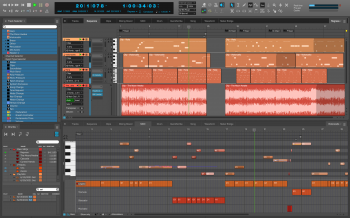
DP 版本 11 提供了令人兴奋的新功能,例如 Nanosampler 2.0、回顾性音频记录、发音图和 MPE 支持,以及 DP 用户要求的数十个工作流程增强功能。
Articulation Maps
借助 DP 的新 Articulation Maps 功能,用户可以完全控制当今最先进的管弦乐音色库的表现深度,包括 VSL、East West、Spitfire、Cinesamples 等。用户可以创建或导入发音图来构建动态乐器和合奏,从而使他们能够以“前所未有的真实感和音乐冲击力”演奏、录制或编程富有表现力的表演。
每个发音都可以映射到 DP 的 QuickScribe 符号编辑器中的符号、词干装饰、替代符头或自定义文本(例如 con sordino)。符号与其管弦乐库的声音保持连接,因此所见即所得。因为音符会记住它们的符号,所以用户可以随时立即切换地图(例如,切换到不同的声音库)。此外,每个发音都可以触发多种形式的输出,从速度变化到音符堆栈,甚至支持最先进的管弦乐库,例如 VSL Synchron 引擎。DP 的图形编辑器在单独的通道中提供清晰、直观的关节编辑。
支持 MIDI 复音表达 (MPE) 和 Per-Note CC
在 DP 11 中,用户可以将来自 MPE 控制器(例如 Roli Seaboard)的多通道输出记录为带有封装 MPE 表达式数据的常规 MIDI 音符。在录制一系列手势(敲击、压力、滑动、滑行和抬起)后,用户会看到单个普通 MIDI 音符流,每个音符都包含自己的音符特定控制器(由演奏生成)叠加在每个音符的顶部,以便于轻松和在 DP 熟悉的钢琴卷中进行直观的编辑。或者,用户可以使用 DP 熟悉且功能强大的连续控制器 (CC) 编辑工具在单独的通道中查看和编辑每个控制器。新的缩放工具允许用户通过向上或向下拖动来增加或减少表达量。MX4 和 DP 的其他包含的合成器插件支持 MPE,因此用户可以立即开始使用他们的 MPE 控制器。
音频回顾记录
DP11 在其回顾记录功能中添加了音频。现在,DP 始终监听 MIDI 和音频输入源,捕获所有内容,即使在不录制时也是如此。就像魔术一样,用户可以立即回忆起他们最近播放过的任何音频或 MIDI 素材。对于 MIDI 和音频输入,Digital Performer 确保您永远不会失去那宝贵的、稍纵即逝的创意时刻。
Nanosampler 2.0 Nanosampler
的这一重大升级是每个 DP 用户的首选虚拟乐器,用于创建独特的节拍、乐器和声音。放入一个样本,然后开始拉伸、切片、随机化并将音频转换为您可以想象的任何声音或乐器。新功能包括:三种播放模式(经典、1-shot 和 Slice)、ZTX 时间拉伸、带有随机和自动随机化的节拍切片、重复、反向以及从头开始重写 UI。
支持 macOS Big Sur 和 Apple 硅 Mac
DP11 完全适用于 macOS Big Sur (11.x) 和最新一代 Apple 硅 Mac。不需要罗塞塔。DP 的音频引擎针对本机多核性能进行了优化,优先考虑高速内核上的音频线程,并为关键、时间敏感的处理预留 CPU 带宽。
使用 Novation 和 Akai Pad 控制器触发剪辑 通过
Novation Launchpad Pro mk3 或 Akai APC-40 等流行的打击垫控制器,获得对 DP 广泛的剪辑窗口的完全动手控制。触发单个剪辑或整个场景(歌曲部分)。随时随地应用过滤器扫描和其他效果处理:Digital Performer 现在是一个强大的现场表演平台,可以将您的节目带到您能想象到的任何地方。
适用于 Native Instruments 和 Icon
DP 11 的新控制表面插件包括适用于当前 Native Instruments Komplete Kontrol 产品线的新控制表面插件,包括 M32、A 系列和 S 系列 MK2 控制器系列,以及热门的新 iCON Control混合工作台面,如 QCon Pro G2/EX、Pro X/XS、Platform Nano 和 Platform M/X 系列。这些最先进的控制界面增强了您的 DP 工作流程,因此您可以更快、更直观地工作。
增强的 Avid EuCon 支持
DP 的 EuCon 插件已大幅更新,包括对 Avid S6 控制台的支持。此外,您现在可以将兼容 EuCon 的工作台与在 Windows 10 上运行的 DP 结合使用。
其他增强功能:
现场表演模式 – 所有效果处理都是实时完成的,而不是预先生成的,以便在关键表演情况下即时响应。
块文件夹和播放列表 – 将序列和歌曲组织到文件夹和播放列表中。播放列表非常适合为现场表演构建设置列表。
块列表拆分视图 — 改进了块列表管理。例如,在一个列表部分中搜索一个块,然后将其拖到另一个文件夹或播放列表中。
多通道 MIDI 轨道 — 您现在可以在单个轨道中录制和播放多个 MIDI 数据通道。通道信息与轨道中的每个 MIDI 事件一起存储。
增强的视图过滤——使用扩展的轨道选择器快速显示/隐藏单个 MIDI 通道数据和/或特定事件类型。
增强对 MCU 和 HUI 兼容控制表面的支持 — 包括改进的自动化切换、擦洗模式、发送模式、循环切换等。
更多控制表面增强功能 — V-Racks 现在可以显示在所有控制表面(支持它们)上。新的轨道固定模式可确保您始终看到所需的轨道。序列编辑器和混音板中的新轨道指示灯显示任何控制表面上当前处于活动状态的轨道。
轨道和剪辑效果——每个音轨、MIDI 轨道和剪辑现在都有一个移调设置,使原始数据不受影响。MIDI 轨道和剪辑也有量化设置。
智能音频接口选择 — 在 macOS 上,如果您尚未选择要与 DP 一起使用的音频硬件,它会为您找到最佳选择。
剪辑窗口增强——“新建空剪辑场景”命令用新的空剪辑填充空单元格。“双剪辑循环”功能将剪辑中循环部分的长度加倍。
列表字体缩放——调整 DP 列表窗口中的文本大小,独立于 UI 其余部分的缩放,使用列表窗口、项目注释和歌词的三个独立控件。
Windows 上的文本渲染和对话框缩放——针对 Windows 10 中最新的文本渲染引擎进行了优化,DP 的文本显得更加清晰。DP 还会根据计算机屏幕的大小和分辨率调整系统对话框和菜单的大小。
动态调整大小的通道条 — 当您使混音板和通道条窗口更高(或更短)时,DP 的推子会调整大小。
“转置排除”选项 — 新的轨道设置可锁定转置操作中的轨道。
新的缩放工具 – 只需垂直拖动即可快速缩放每个音符的表达数据。
Team R2R | 18 Apr 2022 | 1.10GB
DP version 11 delivers exciting new features like Nanosampler 2.0, Retrospective Audio Record, Articulation Maps and MPE Support, plus dozens of workflow enhancements requested by DP users.
Articulation Maps
With DP’s new Articulation Maps feature, users can take full control of the expressive depth of today’s most advanced orchestral sound libraries, including VSL, East West, Spitfire, Cinesamples and many others. Users can create or import articulation maps to build dynamic instruments and ensembles, allowing them to play, record or program expressive performances with “unprecedented realism and musical impact”.
Each articulation can be mapped to a symbol, stem ornament, alternate notehead or custom text (such as con sordino) in DP’s QuickScribe notation editor. Symbols remain connected to their orchestra library sounds, so that what you see is what you hear. Because notes remember their symbol, users can instantly switch maps at any time (to a different sound library, for example). In addition, each articulation can trigger multiple forms of output, from on-velocity changes to note stacks, providing support for even the most advanced orchestra libraries, such as the VSL Synchron engine. DP’s Graphic Editor provides clear, intuitive editing of articulations in separate lanes.
Support for MIDI Polyphonic Expression (MPE) and Per-Note CCs
In DP 11, users can record multi-channel output from an MPE controller — such as a Roli Seaboard — as regular MIDI notes with encapsulated MPE expression data. After recording a range of gestures (strike, pressure, slide, glide and lift), users see a single stream of normal MIDI notes each containing their own note-specific controllers (generated by the performance) superimposed on top of each note for easy and intuitive editing in DP’s familiar piano roll. Or users can view and edit each controller in a separate lane using DP’s familiar and powerful continuous controller (CC) editing tools. A new Scale tool allows users to increase or reduce the amount of expression by dragging up or down. MX4 and DP’s other included synth plug-ins are MPE-enabled, so users can get started with their MPE controller right away.
Audio Retrospective Record
DP11 adds audio to its Retrospective Recording capabilities. Now, DP always listens to both MIDI and audio input sources, capturing everything, even when not recording. Like magic, users can immediately recall any audio or MIDI material they’ve recently played. For both MIDI and audio input, Digital Performer ensures that you’ll never lose that precious, fleeting creative moment.
Nanosampler 2.0
This major upgrade of Nanosampler serves as every DP user’s go-to virtual instrument for creating unique beats, instruments and sounds. Drop in a sample and start stretching, slicing, randomizing and transforming audio into just about any sound or instrument you can imagine. New features include: three playback modes (Classic, 1-shot and Slice), ZTX time stretching, beat slicing with Randomize and Auto Randomize, Repeat, Reverse, and a ground-up rewrite of the UI.
Support for macOS Big Sur and Apple silicon Macs
DP11 is fully qualified for macOS Big Sur (11.x) and the latest generation Apple silicon Macs. No Rosetta required. Optimized for native multi-core performance, DP’s audio engine prioritizes audio threads on high-speed cores and reserves CPU bandwidth for critical, time-sensitive processing.
Clip Triggering With Novation and Akai Pad Controllers
Gain complete hands-on control of DP’s extensive Clips window with popular pad controllers like the Novation Launchpad Pro mk3 or Akai APC-40. Trigger individual clips or entire scenes (sections of songs). Apply filter sweeps and other effects processing as you go: Digital Performer is now a powerhouse live performance platform that can take your shows wherever you can imagine.
New Control Surface plug-ins for Native Instruments and Icon
DP 11 includes new control surface plug-ins for the current Native Instruments Komplete Kontrol lineup, including the M32, A-Series, and S-Series MK2 controller lines, plus hot new iCON Control mixing worksurfaces like the QCon Pro G2/EX, Pro X/XS, Platform Nano and Platform M/X series. These state-of-the-art control surfaces empower your DP workflow so you can work faster and more intuitively.
Enhanced Avid EuCon Support
DP’s EuCon plug-in has been substantially updated, including support for the Avid S6 console. In addition, you can now use a EuCon-compatible worksurface with DP running on Windows 10.
Other enhancements:
Live Performance Mode — All effects processing is done in real time, rather than pre-generated, for instant responsiveness in critical performance situations.
Chunk Folders and Playlists — Organize sequences and songs into folders and playlists. Playlists are perfect for building set lists for live shows.
Chunks List Split View — Improves chunk list management. For example, search for a chunk in one list section and then drag it into a folder or playlist in the other.
Multi-channel MIDI Tracks — You can now record and play multiple channels of MIDI data in a single track. Channel info is stored with each MIDI event in the track.
Enhanced View Filtering — Quickly show/hide individual MIDI channel data and/or specific event types with the expanded Track Selector.
Enhanced Support for MCU and HUI-compatible Control Surfaces — Includes improved automation toggling, scrub modes, send mode, loop toggle and much more.
More Control Surface Enhancements — V-Racks can now be displayed on all control surfaces (that support them). New track pinning modes ensure that you always see the tracks you need. New track indicator lights in the Sequence Editor and Mixing Board show which tracks are currently active on any control surface.
Track and Clip Effects — Every audio track, MIDI track and clip now has a transpose setting that leaves the original data unaffected. MIDI tracks and clips also have a quantize setting.
Intelligent Audio Interface Selection — On macOS, if you haven’t yet selected the audio hardware you wish to use with DP, it finds the best option for you.
Clips Window Enhancements — The ‘New Empty Clips Scene’ command fills empty cells with new empty clips. The ‘Double Clip Loop’ feature doubles the length of the looped portion in a clip.
List Font Scaling — Resize the text in DP’s list windows, independent of the scaling for the rest of the UI, with three independent controls for List windows, Project Notes and Lyrics.
Text Rendering and dialog box scaling on Windows — Optimized for the latest text rendering engine in Windows 10, DP’s text appears significantly crisper. DP also resizes system dialogs and menus appropriately for the size and resolution of your computer screen.
Dynamically Resizable Channel Strips — DP’s faders resize when you make the Mixing Board and Channel Strip windows taller (or shorter).
‘Transpose Exclude’ option — A new track setting locks tracks from Transpose operations.
New Scale Tool — Quickly scales per-note expression data by simply dragging vertically.
原创文章,作者:steven,如若转载,请注明出处:https://rr3d.cn/31822.html
